在 Azure 虚拟机或 AKS 上部署中心化 OpenTelemetry 收集器
中心化的 OpenTelemetry Collector 负责接收来自 Azure 服务的遥测数据,并发送到 SigNoz。它把运行 Collector 的平台团队和只负责向其发送数据的应用团队解耦开来。Collector 还会从 Azure Monitor 采集指标,从 Azure Event Hub 采集日志。
本指南介绍如何通过 Helm 将 Collector 部署到 Azure Kubernetes Service (AKS),或部署到 Azure 虚拟机 (VM) 上。
前提条件
- 有效的 Azure 订阅。
- 本机安装了 Azure CLI。
- 一个用于日志的 Event Hub,参见 EventHub Setup。
- 一个 SigNoz Cloud 账号。
- Kubernetes 部署方式:一个可以安装 Helm chart 的集群。
准备 Azure 凭据
Collector 需要一个用于日志的 Event Hub 连接字符串,以及一个用于 Azure Monitor 指标的服务主体 (service principal)。
第 1 步:获取 Event Hub 连接字符串
按照 Event Hub setup 的说明,为 Event Hub 创建仅供监听的 signozListen SAS 策略,并复制其主连接字符串。格式如下:
connection: Endpoint=sb://namespace.servicebus.windows.net/;SharedAccessKeyName=signozListen;SharedAccessKey=superSecret1234=;EntityPath=hubName第 2 步:为 Azure Monitor 创建服务主体
- 创建服务主体,可命名为
signoz-central-collector-app,重定向 URI 留空。 - 为其分配读取角色,可以授予整个订阅的读取权限。
- 创建客户端密钥 (client secret) 并复制保存。Collector 配置中会将其用作
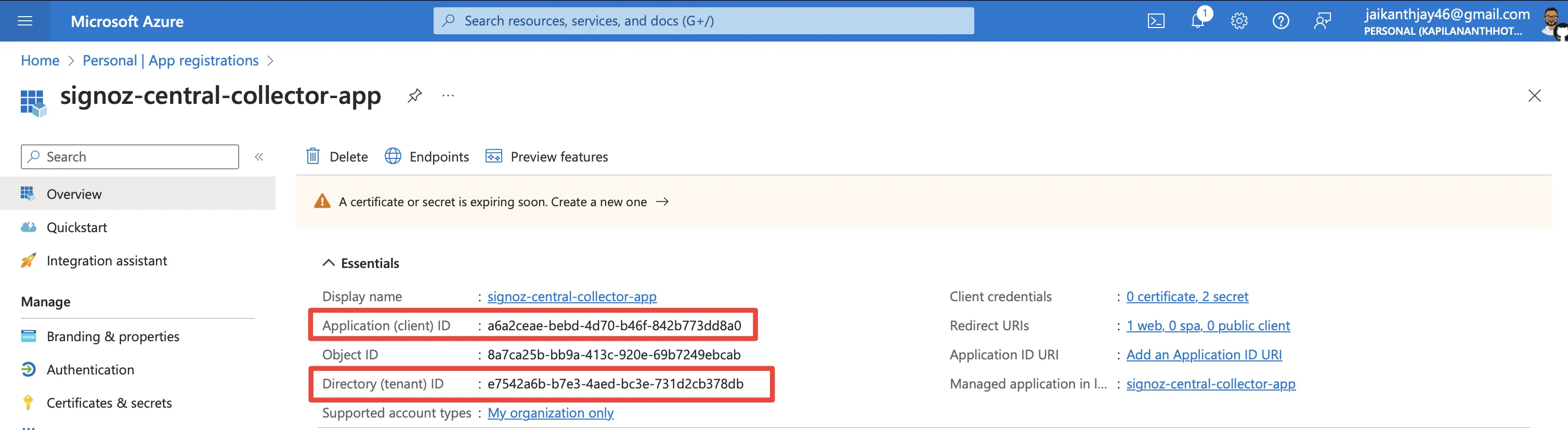
client_secret。 - 在 Azure portal 中,打开你创建的应用程序。从 Overview(概览)部分复制 Application (client) ID(应用程序/客户端 ID)和 Directory (tenant) ID(目录/租户 ID)。
部署 Collector
Kubernetes (Helm) 虚拟机步骤 1. 添加 OpenTelemetry Helm 仓库
复制helm repo add open-telemetry https://open-telemetry.github.io/opentelemetry-helm-charts步骤 2. 将凭据存储在 Secret 中
该 Chart 将 Collector 配置存储在 ConfigMap 中,而 Kubernetes 不会对其进行加密。请将这些三个凭据存储在 Secret 中,Collector 将从环境变量中读取它们。将 <namespace> 替换为 Collector 所在的 Kubernetes 命名空间:
kubectl create namespace <namespace>
kubectl create secret generic signoz-azure-collector -n <namespace> \
  --from-literal=eventhub-connection-string='<Primary Connection String>' \
  --from-literal=azure-client-secret='<Client Secret>' \
  --from-literal=signoz-ingestion-key='<ingestion-key>'
请核实这些值:
<Primary Connection String>:步骤 1 中获取的 Event Hub 连接字符串。<Client Secret>:步骤 2 中获取的客户端密钥。<ingestion-key>:你的 SigNoz 摄入密钥。
步骤 3. 创建 values 文件
创建 otel-collector-values.yaml,内容如下。该 chart 从 config 键读取 collector 配置,image.repository 指定 contrib 镜像(内置 Azure Monitor 和 Event Hub 接收器)。extraEnvs 从 Secret 加载凭据,配置中通过 ${env:...} 读取这些凭据。
mode: deployment

image:
  repository: otel/opentelemetry-collector-contrib

# 从 signoz-azure-collector Secret 中读取凭据,而不是从 ConfigMap 中读取
extraEnvs:
  - name: EVENTHUB_CONNECTION_STRING
    valueFrom:
      secretKeyRef:
        name: signoz-azure-collector
        key: eventhub-connection-string
  - name: AZURE_CLIENT_SECRET
    valueFrom:
      secretKeyRef:
        name: signoz-azure-collector
        key: azure-client-secret
  - name: SIGNOZ_INGESTION_KEY
    valueFrom:
      secretKeyRef:
        name: signoz-azure-collector
        key: signoz-ingestion-key

config:
  service:
    pipelines:
      metrics/am:
        receivers: [azuremonitor]
        processors: [memory_limiter, batch]
        exporters: [otlphttp]
      traces:
        receivers: [otlp]
        processors: [memory_limiter, batch]
        exporters: [otlphttp]
      metrics:
        receivers: [otlp]
        processors: [memory_limiter, batch]
        exporters: [otlphttp]
      logs:
        receivers: [otlp]
        processors: [memory_limiter, batch]
        exporters: [otlphttp]
      logs/azure:
        receivers: [azureeventhub]
        processors: [memory_limiter, resource/azure, batch]
        exporters: [otlphttp]

  receivers:
    otlp:
      protocols:
        grpc:
          endpoint: 0.0.0.0:4317
        http:
          endpoint: 0.0.0.0:4318
    # 在 Collector v0.145.0 及更高版本中,可以使用 "azure_event_hub" 以避免弃用警告。
    azureeventhub:
      connection: ${env:EVENTHUB_CONNECTION_STRING}
      format: "azure"
      apply_semantic_conventions: true
    # 在 Collector v0.148.0 及更高版本中,可以使用 "azure_monitor" 以避免弃用警告。
    azuremonitor:
      subscription_ids: ["<Subscription ID>"]
      tenant_id: "<AD Tenant ID>"
      client_id: "<Client ID>"
      client_secret: ${env:AZURE_CLIENT_SECRET}
      resource_groups: ["<rg-1>"]
      collection_interval: 60s

  processors:
    batch: {}
    memory_limiter:
      check_interval: 5s
      limit_percentage: 80
      spike_limit_percentage: 25
    resource/azure:
      attributes:
        - key: source_type
          value: "azureeventhub"
          action: upsert

  exporters:
    # 在 Collector v0.144.0 及更高版本中,可以使用 "otlp_http" 以避免弃用警告。
    otlphttp:
      endpoint: "https://ingest.<region>.signoz.cloud:443"
      headers:
        signoz-ingestion-key: ${env:SIGNOZ_INGESTION_KEY}
请核对以下值:
<Subscription ID>、<AD Tenant ID>和<Client ID>:来自第 2 步的值。<rg-1>:要采集指标的资源组。<region>:你的 SigNoz Cloud region。
第 4 步:安装 chart
使用与第 2 步相同的 <namespace>:
helm install -n <namespace> --create-namespace otel-collector open-telemetry/opentelemetry-collector -f otel-collector-values.yaml所有 chart 配置项请参考 OpenTelemetry Collector Helm chart。
第 1 步:安装 Collector
在 VM 上,把 OpenTelemetry Collector Contrib 二进制文件下载到你将要创建 config.yaml 的目录:
ARCH=$(uname -m | sed 's/x86_64/amd64/;s/aarch64/arm64/')
curl -fsSL "https://github.com/open-telemetry/opentelemetry-collector-releases/releases/download/v0.163.2/otelcol-contrib_0.163.2_linux_${ARCH}.tar.gz" | tar -xz otelcol-contrib
第 2 步:将凭据保存到环境文件
在同一目录下创建 collector.env,写入凭据。请保留单引号,因为连接字符串中包含分号:
EVENTHUB_CONNECTION_STRING='<Primary Connection String>'
AZURE_CLIENT_SECRET='<Client Secret>'
SIGNOZ_INGESTION_KEY='<ingestion-key>'
请核对以下值:
<Primary Connection String>:来自第 1 步的 Event Hub 连接字符串。<Client Secret>:来自第 2 步的客户端密钥。<ingestion-key>:你的 SigNoz ingestion key。
限制该文件仅允许当前用户读取:
Copychmod 600 collector.env第 3 步。创建配置文件
使用以下内容创建 config.yaml。Collector 会读取由 collector.env 设置的环境变量中的凭证:
service:
pipelines:
metrics/am:
receivers: [azuremonitor]
processors: [memory_limiter, batch]
exporters: [otlphttp]
traces:
receivers: [otlp]
processors: [memory_limiter, batch]
exporters: [otlphttp]
metrics:
receivers: [otlp]
processors: [memory_limiter, batch]
exporters: [otlphttp]
logs:
receivers: [otlp]
processors: [memory_limiter, batch]
exporters: [otlphttp]
logs/azure:
receivers: [azureeventhub]
processors: [memory_limiter, resource/azure, batch]
exporters: [otlphttp]
receivers:
otlp:
protocols:
grpc:
endpoint: 0.0.0.0:4317
http:
endpoint: 0.0.0.0:4318
在 Collector v0.145.0 及更高版本中,可以使用 "azure_event_hub" 以避免弃用警告。
azureeventhub:
connection: ${env:EVENTHUB_CONNECTION_STRING}
format: "azure"
apply_semantic_conventions: true
在 Collector v0.148.0 及更高版本中,可以使用 "azure_monitor" 以避免弃用警告。
azuremonitor:
subscription_ids: ["<Subscription ID>"]
tenant_id: "<AD Tenant ID>"
client_id: "<Client ID>"
client_secret: ${env:AZURE_CLIENT_SECRET}
resource_groups: ["<rg-1>"]
collection_interval: 60s
processors:
batch: {}
memory_limiter:
check_interval: 5s
limit_percentage: 80
spike_limit_percentage: 25
resource/azure:
attributes:
- key: source_type
value: "azureeventhub"
action: upsert
exporters:
在 Collector v0.144.0 及更高版本中,可以使用 "otlp_http" 以避免弃用警告。
otlphttp:
end