
vercel 17天前 · 2026-10-24 00:07:01 · 13 阅读
Vercel Connect 新增托管 Stripe API 密钥功能
Vercel Connect 现在可以为每个 agent 或任务单独创建一个 受限的 Stripe API key。在创建 Stripe connector 时,你现在可以选择 Managed API Key 作为连接方式。
Vercel 会在你的 Stripe 账户中创建该 key,并仅限于你选择的权限范围。原有的 MCP 和自带 API key 方式保持不变。
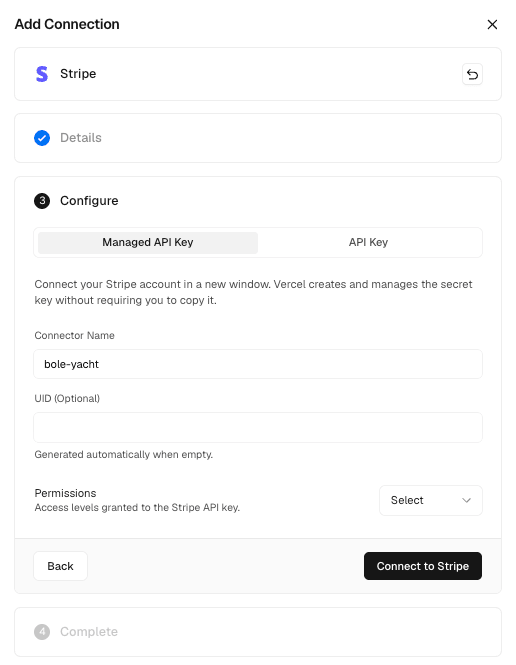
大多数应用和 agent 都在用 Stripe 的默认 secret key,它拥有账户的全部权限。而按 agent 分配 key 后,每个 agent 只能获得其工作所需的访问权限。例如,日报收入统计 agent 可以限制为只读 charges 数据,而客户入驻 agent 则可以限制为只能写入 customers。
Key 由 Vercel 创建和保管,你无需再手动粘贴 secret key。你可以在 connector 的设置中直接轮换 key,无需重新部署;切换期间旧 key 最长仍可使用 24 小时。
Copy link to heading添加 Stripe connector
在 connectors 目录中创建 Stripe connector,选择 Managed API Key,设置权限并附加到你的项目即可。你也可以从 CLI 开始,它会打开浏览器完成后续设置:
1vercel connect create stripe --connection-method managed-api-key --name acme-stripe2vercel connect attach stripe/acme-stripe --project my-app --environment production用 Vercel CLI 添加 Stripe connector
1import Stripe from 'stripe';2import { getToken } from '@vercel/connect';3const key = await getToken('stripe/acme-stripe', {4 subject: { type: 'app' },5});6const stripe = new Stripe(key);7const customers = await stripe.customers.list({ limit: 10 });运行时通过 connector 的 UID 调用 getToken 获取受限 key
要开始使用,请添加 Stripe 连接器 或查阅 文档。
原始来源: vercel