
探索使用 Nx、TanStack 和 Rust 的多语言 monorepos
本文是 Nx 多语言 monorepo 系列的一部分:
- 探索 Nx、TanStack 和 Rust 多语言 monorepo
- 借助 @nx/dotnet 实现跨语言的全栈类型安全
多语言 monorepo(即包含多种不同技术栈的 monorepo)将越来越普遍。主要驱动力来自 agentic development(智能体开发),我最近观察到两个主要趋势:
- AI 智能体在 monorepo 中大放异彩。这也是为什么越来越多的人开始考虑迁移的原因。一个典型例子:将前端和后端整合进同一个 monorepo
- 学习新语言的门槛大幅降低。AI 智能体能够承担大量的维护开销和低层编码工作。
Nx 早已支持多语言:包括 .NET、Java、Rust 以及 Python。我近期会陆续推出这些语言的专题文章,但本篇将聚焦于 Rust。
不过我希望更进一步,看看能让智能体做到什么程度。于是我让 Codex 完成了以下任务:
- 基于一个已有的 PNPM workspace monorepo(其中包含 TanStack Start 应用)
- 将其改造为 Nx monorepo
- 将 Rust 加入技术栈,具体做法是引入一个基于 Topcoat 的 Web 应用
- 在 JavaScript Web 应用和 Rust 部分之间共享代码
- 使用 Nx Cloud 和 Nx Agents 配置 CI
本文逐步讲解设置过程(也可以观看链接中的视频)。完整的 workspace 也已上传至 GitHub:juristr/nx-polyglot-rust,你可以直接让智能体指向它进行探索。
现有的 pnpm monorepo
起点是一个 PNPM workspace,这是以 JS 为基础构建 monorepo 的常见方式。
TanStack Start 应用位于 apps/web,各类包则放在 packages/ 目录下。
packages:
  - 'apps/*'
  - 'packages/*'
  - 'packages/*/*'
我还在此基础上添加了 Nx(只需运行 nx init)。为什么加入 Nx 很重要? Nx 提供了一个通用任务运行器,能够同时运行 JavaScript 和 Rust 目标。PNPM 适用于 JS 工作区,因此能触发 package.json 脚本,但不一定能触发 Cargo 别名。虽然我们可以强行让 PNPM 去触发那些命令,但我更不想这么做。
在workspace中添加Rust
那么我们如何将 Rust 安装到 workspace 中呢?我选择了 mise,我已经用了一段时间来管理各种工具的安装和版本控制。
mise 在这里的作用是通过驱动 rustup 来在 workspace 中安装 Rust 工具链,从而引入 Cargo、rustc 和 clippy,并使用定义的固定版本。优点在于:稍后在 CI 中也使用 mise,我可以避免各种本地与 CI 之间的版本冲突。
Rust monorepo 中包是如何链接的
Rust 有 Cargo(可以类比为 JS 世界中的 PNPM + package.json 脚本)。Cargo 有自己的 workspace 概念。根目录下的 Cargo.toml 列出了成员并集中管理共享依赖版本,包括本地 crate 之间的路径依赖(Rust 中的包):
[workspace]
resolver = "2"
members = [
  "apps/topcoat-security",
  "packages/shared/security-contract",
  "packages/topcoat/security-domain",
  "packages/topcoat/security-store",
  "packages/topcoat/security-ui",
]

[workspace.dependencies]
serde = { version = "1.0.228", features = ["derive"] }
tokio = { version = "1.49.0", features = ["macros", "rt-multi-thread", "sync", "time"] }
topcoat = { version = "0.5.0", features = ["sse"] }
topcoat-security-domain = { path = "packages/topcoat/security-domain" }
topcoat-security-store = { path = "packages/topcoat/security-store" }
各个 crate 随后通过 .workspace = true 来使用这些条目:
[dependencies]
topcoat.workspace = true
topcoat-security-domain.workspace = true
这对应于 pnpm 端的 workspace:*。
注意,Nx 并不参与其中的任何环节,就像 PNPM 为 JS 包做链接一样,Cargo 负责解析和链接 crates。
教会 Nx 运行 Rust 目标
Rust 支持来自 @monodon/rust 插件,注册在 nx.json 中。
运行以下命令即可将它添加到你的 workspace:
nx add @monodon/rust之后你会看到插件已注册到 nx.json 中:
{
  "$schema": "./node_modules/nx/schemas/nx-schema.json",
  ...
  "plugins": [
    "@monodon/rust"
  ]
}
这个插件相当于一个适配器,把 Cargo 的操作暴露给 Nx,让 Nx 能把它们识别为可运行的目标——就像 Nx 自动检测 package.json 中的 script 目标一样。
因此,运行 nx build <rust-project> 会触发 cargo build,test 对应 cargo test,lint 对应 cargo clippy,run 对应 cargo run。
Nx 插件是一个让 Nx 能理解原本不认识的工具的包。它读取该工具已经在用的配置文件(比如 Cargo.toml、pom.xml、vite.config.ts),并从中推导出项目、目标和依赖关系,这样缓存和 affected 功能就能直接生效,无需你手动编写这些接线代码。
需要注意:插件是可选的。任何包含 project.json 的文件夹本身就是一个 Nx 项目。所以你也可以手动给 Rust 项目添加 project.json 并定义要运行的目标,例如:
  {
    "name": "some-rust-package",
    "sourceRoot": "packages/.../src",
    "targets": {
      "build": {
        "command": "cargo build -p some-rust-package",
        "options": { "cwd": "{workspaceRoot}" }
      }
    }
  }
插件只是提升开发体验的一种方式。
想了解已有插件,可以查阅 Nx plugins、multi-language support 和 plugin registry。
JavaScript 项目通过 package.json 中的 scripts 声明任务,Nx 会直接识别。而 Rust crate 没有 package.json,所以要在 project.json 中声明目标:
{
  "name": "topcoat-security",
  "projectType": "application",
  "tags": ["scope:topcoat", "type:app", "lang:rust"],
  "targets": {
    "build": {
      "executor": "@monodon/rust:build",
      "outputs": ["{options.target-dir}"],
      "options": { "target-dir": "dist/target/topcoat-security/build" }
    },
    "test": {
      "executor": "@monodon/rust:test",
      "outputs": ["{options.target-dir}"],
      "options": { "target-dir": "dist/target/topcoat-security/test" }
    },
    "lint": {
      "executor": "@monodon/rust:lint",
      "outputs": ["{options.target-dir}"],
      "options": { "target-dir": "dist/target/topcoat-security/lint" }
    },
    "run": {
      "continuous": true,
      "executor": "@monodon/rust:run",
      "outputs": ["{options.target-dir}"],
      "options": { "target-dir": "dist/target/topcoat-security/run" }
    }
  }
}
"executor": "@monodon/rust:build" 正是任务委托给底层 @monodon/rust 插件的 build 目标的入口。
两套技术栈采用一致的命令执行方式
我个人非常喜欢这个方案的一点是,只需输入以下命令,Nx 就会在整个代码库中自动运行所有任务:
pnpm nx run-many -t build lint test typecheck这意味着 Cargo、Vite、tsc、ESLint 等工具都能按照正确的依赖顺序执行,并且包含缓存机制。
跨两套技术栈的任务流水线
Nx 在这里并不关心底层调用的是哪个工具。在任务层面,它们都是一样的,因此现有的概念如定义任务流水线也能直接使用。
例如,这里我们定义:每当启动 TanStack Start 应用(通过 pnpm nx dev web),都要自动同时启动 Rust Topcoat 前端应用(topcoat-security):
{
  "nx": {
    "targets": {
      "dev": {
        "continuous": true,
        "dependsOn": [{ "projects": ["topcoat-security"], "target": "run" }]
      }
    }
  }
}
这将转化为如下任务流水线:
web:dev
  -> topcoat-security:run (continuous)
       -> security-globe:vite:build
Nx 对 Rust 的缓存
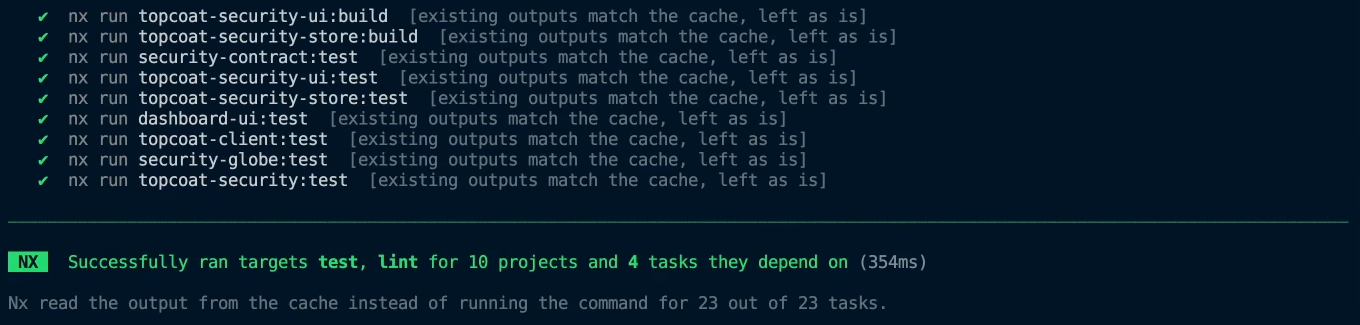
在 Nx 中,Rust 目标的缓存功能开箱即用。我们只需定义哪些内容需要缓存,以及输入和输出分别是什么。
nx.json{
"namedInputs": {
"rust": [
"default",
"{workspaceRoot}/Cargo.toml",
"{workspaceRoot}/Cargo.lock",
"{workspaceRoot}/rust-toolchain.toml",
"{workspaceRoot}/.mise.toml",
"{workspaceRoot}/pnpm-lock.yaml"
]
},
"targetDefaults": {
"@monodon/rust:build": {
"cache": true,
"inputs": ["rust", "^rust"],
"dependsOn": ["^build"]
},
"@monodon/rust:test": {
"cache": true,
"inputs": ["rust", "^rust"],
"dependsOn": ["^build"]
},
"@monodon/rust:lint": { "cache": true, "inputs": ["rust", "^rust"] }
}
}另一个与 Rust 相关的细节是上述 project.json 中各目标的 target-dir。Cargo 默认会将编译产物写入同一个共享的 target/ 目录。如果 build、test、lint 和 run 都指向同一目录,它们的产物会相互覆盖。为每个目标在 dist/target/<project>/<target> 下分配独立目录即可解决该问题。
CI on Nx Cloud
不过,配置 monorepo 不应止步于本地设置。因此我让 Codex 配置 monorepo,并同时告知它配置 Nx Cloud 作为 CI 基础设施,包括使用 Nx Agents。顺便说一句,这部分并不与 Rust 相关,CI 配置指南适用于任意 Nx 工作区。
最终效果如下:
.g