
Voxtral 小型 24B 2507

Voxtral Small 24B 2507(mistralai/voxtral-small-24b-2507)是 Mistral AI 推出的 Voxtral 系列模型,参数量 24.3B,支持 32K token 上下文窗口,输入价格为 $0.10/1M token,输出价格为 $0.30/1M token。可通过 haimaker.ai 的 OpenAI 兼容 API 调用。
概述
Voxtral Small 基于 Mistral Small 3 打造,在保持顶级文本处理能力的基础上,融入了业界领先的音频输入能力,擅长语音转录、翻译及音频理解。
模型说明
Voxtral Small 1.0 (24B) - 2507
Voxtral Small 是对 Mistral Small 3 的升级版本,在延续顶尖文本性能的同时,加入了前沿的音频输入能力,可高效完成语音转录、翻译与音频理解。
更多 Voxtral 相关信息,请参阅我们的官方博客或研究论文。
核心特性
Voxtral 以 Mistral Small 3 为基础,强化了强大的音频理解能力。
- 专用转录模式:Voxtral 支持纯语音转录模式以发挥极致性能。默认情况下,模型会自动识别音频源语言并生成对应文本。
- 长上下文支持:凭借 32K token 的上下文长度,Voxtral 可处理长达 30 分钟的语音转录或 40 分钟的多轮音频理解任务。
- 内置问答与摘要功能:支持直接通过语音提问,无需借助独立的 ASR 和语言模型,即可分析音频并生成结构化摘要。
- 原生多语言支持:自动检测语言,并在英语、西班牙语、法语、葡萄牙语、印地语、德语、荷兰语、意大利语等全球主流语言上表现顶尖。
- 语音直连函数调用:支持根据用户的语音指令直接触发后端函数、工作流或 API 调用。
- 文本能力卓越:保留其语言模型主干 Mistral Small 3.1 的文本理解能力
<
基准测试结果
音频
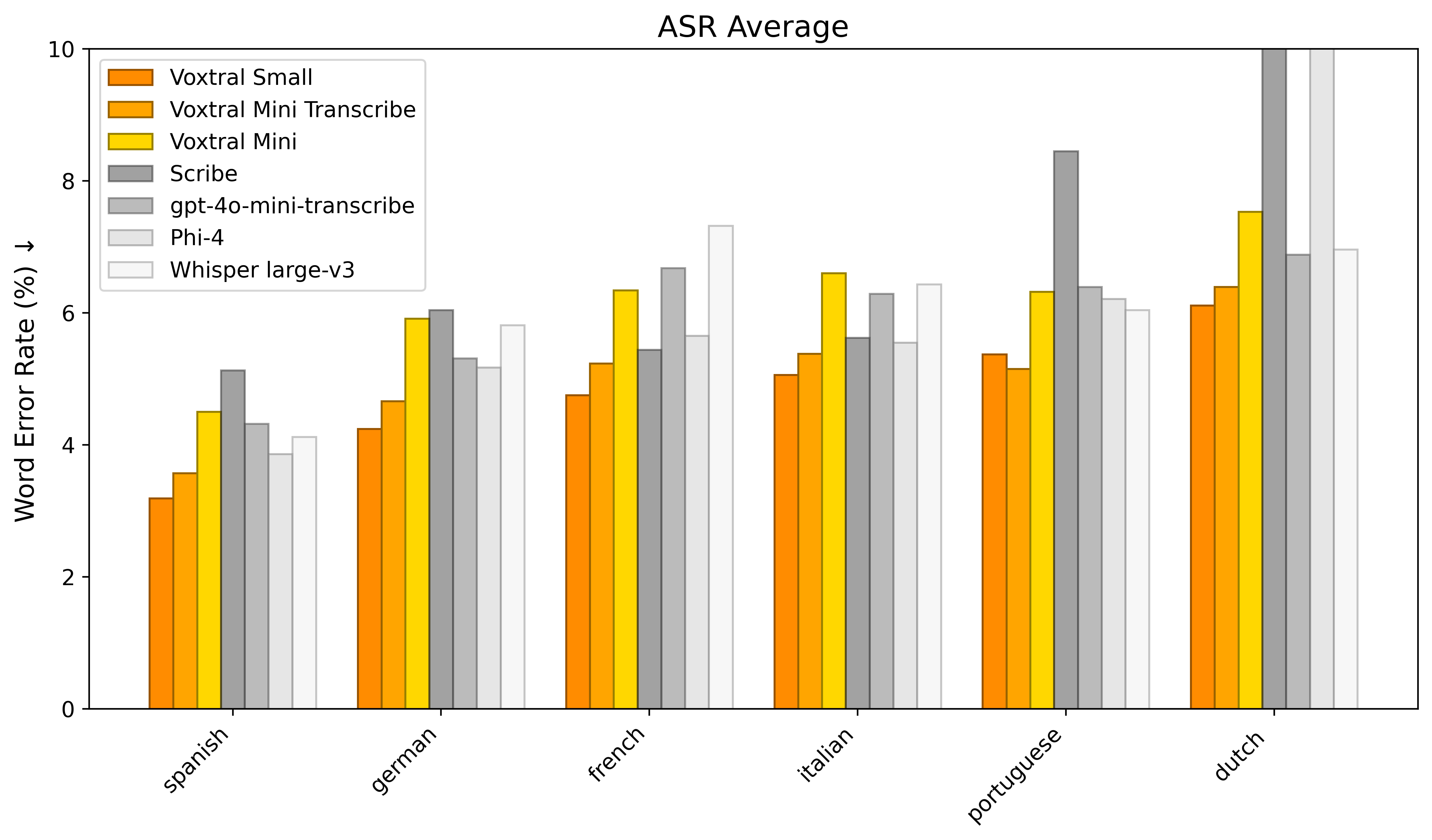
在 FLEURS、Mozilla Common Voice 和 Multilingual LibriSpeech 基准测试上的平均词错误率(WER):
文本
使用方法
该模型可与以下框架配合使用:
注意事项:
- 对话补全(如音频理解)使用
temperature=0.2和top_p=0.95,转写任务使用temperature=0.0 - 支持单条消息中包含多个音频,以及多个含音频的用户交互轮次
- 支持函数调用
- 暂不支持系统提示词
vLLM(推荐)
建议使用 vLLM 运行本模型。
安装
确保安装 vllm >= 0.10.0,推荐使用 uv:
uv pip install -U "vllm[audio]" --system上述操作将自动安装 mistral_common >= 1.8.1。
验证方法:
python -c "import mistral_common; print(mistral_common.__version__)"离线推理
克隆 vLLM 仓库即可验证 vLLM 环境是否正常工作:
git clone https://github.com/vllm-project/vllm && cd vllm然后运行:
python examples/offline_inference/audio_language.py --num-audios 2 --model-type voxtral服务部署
建议在 server/client 架构下使用 Voxtral-Small-24B-2507。
vllm serve mistralai/Voxtral-Small-24B-2507 --tokenizer_mode mistral --config_format mistral --load_format mistral --tensor-parallel-size 2 --tool-call-parser mistral --enable-auto-tool-choice音频指令
利用 Voxtral-Small-24B-2507 的音频能力进行对话。
确保客户端已安装带 audio 功能的 mistral-common:
pip install --upgrade mistral_common[audio]from mistral_common.protocol.instruct.messages import TextChunk, AudioChunk, UserMessage, AssistantMessage, RawAudio
from mistral_common.audio import Audio
from huggingface_hub import hf_hub_download
from openai import OpenAI
# 修改 OpenAI API key 和 API base 以使用 vLLM 的 API 服务器
openai_api_key = "EMPTY"
openai_api_base = "http://<your-server-host>:8000/v1"
client = OpenAI(
api_key=openai_api_key,
base_url=openai_api_base,
)
models = client.models.list()
model = models.data[0].id
obama_file = hf_hub_download("patrickvonplaten/audio_samples", "obama.mp3", repo_type="dataset")
bcn_file = hf_hub_download("patrickvonplaten/audio_samples", "bcn_weather.mp3", repo_type="dataset")
def file_to_chunk(file: str) -> AudioChunk:
audio = Audio.from_file(file, strict=False)
return AudioChunk.from_audio(audio)
text_chunk = TextChunk(text="Which speaker is more inspiring? Why? How are they different from each other? Answer in French.")
user_msg = UserMessage(content=[file_to_chunk(obama_file), file_to_chunk(bcn_file), text_chunk]).to_openai()
print(30 * "=" + "USER 1" + 30 * "=")
print(text_chunk.text)
print("\n\n")
response = client.chat.completions.create(
model=model,
messages=[user_msg],
temperature=0.2,
top_p=0.95,
)
content = response.choices[0].message.content
print(30 * "=" + "BOT 1" + 30 * "=")
print(content)
print("\n\n")
# 模型可能给出以下回答:
# 最具感染力的演讲者是总统。
# 他更有感染力,因为他讲述了自己的个人经历,
# 以及对国家未来的乐观态度。
# 他与另一位演讲者的不同之处在于,他并非谈论天气,
# 而是讲述自己与民众的互动以及担任总统的角色。转录
Voxtral-Small-24B-2507 拥有强大的语音转文字能力!
确保你的客户端已安装带有音频支持的 mistral-common:
pip install --upgrade mistral_common[audio]from mistral_common.protocol.transcription.request import TranscriptionRequest
from mistral_common.protocol.instruct.messages import RawAudio
from mistral_common.audio import Audio
from huggingface_hub import hf_hub_download
from openai import OpenAI
## 修改 OpenAI API Key 和 API Base 以使用 vLLM 的 API 服务。
openai_api_key = "EMPTY"
openai_api_base = "http://:8000/v1"
client = OpenAI(
api_key=openai_api_key,
base_url=openai_api_base,
)
models = client.models.list()
model = models.data[0].id
obama_file = hf_hub_download("patrickvonplaten/audio_samples", "obama.mp3", repo_type="dataset")
audio = Audio.from_file(obama_file, strict=False)
audio = RawAudio.from_audio(audio)
req = TranscriptionRequest(model=model, audio=audio, language="en", temperature=0.0).to_openai(exclude=("top_p", "seed"))
response = client.audio.transcriptions.create(**req)
print(response)
``` 函数调用
Voxtral 支持实验性的函数调用功能,你可以尝试如下用法。
确保你的客户端已安装带有音频支持的 mistral-common:
pip install --upgrade mistral_common[audio]from mistral_common.protocol.instruct.messages import AudioChunk, UserMessage, TextChunk
from mistral_common.protocol.transcription.request import TranscriptionRequest
from mistral_common.protocol.instruct.tool_calls import Function, Tool
from mistral_common.audio import Audio
from huggingface_hub import hf_hub_download