
kazgu 3小时前 · 2026-09-02 11:10:58 · 1 阅读
SkyReels V2:无限时长电影生成模型
📑 · 👋 · 💬 · 🤗 · 🤖
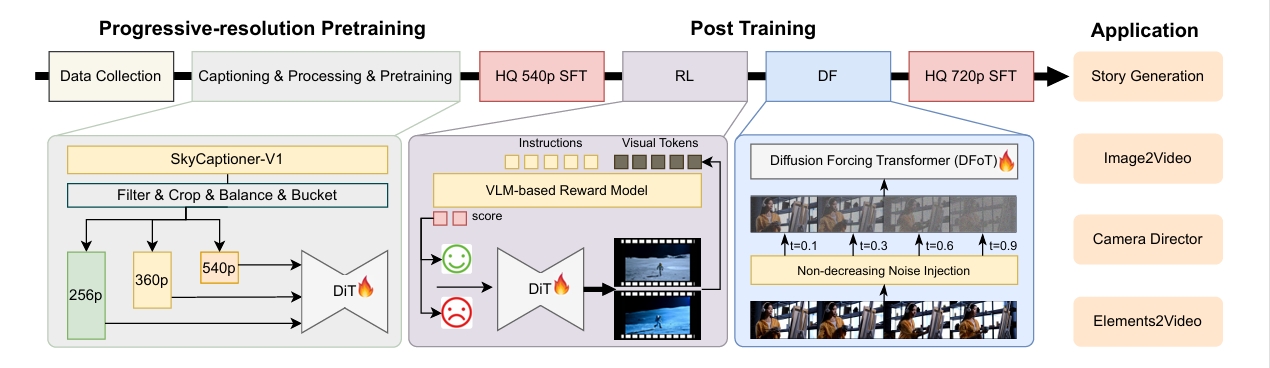
欢迎来到 SkyReels V2 仓库!这里提供无限长度电影生成模型的模型权重和推理代码。据我们所知,这是首个采用 AutoRegressive Diffusion-Forcing 架构的开源视频生成模型,在公开可用的模型中达到了 SOTA 性能。
🔥🔥🔥 最新动态!!
- 2026 年 1 月 29 日:🎉 我们在 apifree.ai 上线了 SkyReels-V3 模型的 API。
- 2026 年 1 月 29 日:🎉 我们发布了 SkyReels-V3 的推理代码和模型权重。
- 2025 年 6 月 1 日:🎉 我们发布了技术报告 SkyReels-Audio:视频 Diffusion Transformer 中的全音频条件人像说话生成。
- 2025 年 5 月 16 日:🔥 我们发布了 Diffusion-Forcing 模型中视频扩展和起始/结束帧控制功能的推理代码。
- 2025 年 4 月 24 日:🔥 我们发布了 720P 模型 SkyReels-V2-DF-14B-720P 和 SkyReels-V2-I2V-14B-720P。前者支持无限长度的自回归视频生成,后者专注于 Image2Video 合成。
- 2025 年 4 月 21 日:👋 我们发布了 SkyReels-V2 系列模型及视频字幕生成模型 SkyCaptioner-V1 的推理代码和模型权重。
- 2025 年 4 月 3 日:🔥 我们还发布了 SkyReels-A2。这是一个开源的可控视频生成框架,能够组合任意视觉元素。
- 2025 年 2 月 18 日:🔥 我们发布了 SkyReels-A1。这是一个开源且高效的人像图像动画框架。
- 2025 年 2 月 18 日:🔥 我们发布了 SkyReels-V1。这是首个也是目前最先进的开源人类中心视频基础模型。
🎥 演示
| compress_demo1.mp4 | compress_demo2.mp4 | compress_demo3.mp4 |
📑 TODO 清单
- 技术报告
- 14B 和 1.3B 模型系列的 Checkpoint
- 单 GPU 和多 GPU 推理代码
- SkyCaptioner-V1:视频字幕生成模型
- Prompt Enhancer
- 集成 Diffusers
- 5B 模型系列的 Checkpoint
- Camera Director 模型的 Checkpoint
- Step & Guidance Distill 模型的 Checkpoint
🚀 快速开始
安装
# 克隆代码仓库。
git clone https://github.kazgu.com/SkyworkAI/SkyReels-V2
cd SkyReels-V2
# 安装依赖。测试环境使用 Python 3.10.12。
pip install -r requirements.txt
下载模型
你可以从 Hugging Face 下载我们的模型:
| 类型 | 模型变体 | 推荐高度/宽度/帧数 | 链接 |
|---|---|---|---|
| Diffusion Forcing | 1.3B-540P | 544 * 960 * 97f | 🤗 Huggingface 🤖 ModelScope |
| 5B-540P | 544 * 960 * 97f | 即将推出 | |
| 5B-720P | 720 * 1280 * 121f | 即将推出 | |
| 14B-540P | 544 * 960 * 97f | 🤗 Huggingface 🤖 ModelScope | |
| 14B-720P | 720 * 1280 * 121f | 🤗 Huggingface 🤖 ModelScope | |
| Text-to-Video | 1.3B-540P | 544 * 960 * 97f | 即将推出 |
| 5B-540P | 544 * 960 * 97f | 即将推出 | |
| 5B-720P | 720 * 1280 * 121f | 即将推出 | |
| 14B-540P | 544 * 960 * 97f | 🤗 Huggingface 🤖 ModelScope | |
| 14B-720P | 720 * 1280 * 121f | 🤗 Huggingface 🤖 ModelScope | |
| 图像生成视频 | 1.3B-540P | 544 * 960 * 97f | 🤗 Huggingface 🤖 ModelScope |
| 5B-540P | 544 * 960 * 97f | 即将推出 | |
| 5B-720P | 720 * 1280 * 121f | 即将推出 | |
| 14B-540P | 544 * 960 * 97f | 🤗 Huggingface 🤖 ModelScope | |
| 14B-720P | 720 * 1280 * 121f | 🤗 Huggingface 🤖 ModelScope | |
| 摄影指导 | 5B-540P | 544 * 960 * 97f | 即将推出 |
| 5B-720P | 720 * 1280 * 121f | 即将推出 | |
| 14B-720P | 720 * 1280 * 121f | 即将推出 |
下载完成后,请在生成命令中设置模型路径:
单 GPU 推理
- 用于长视频生成的 Diffusion Forcing
Diffusion Forcing 版本的模型支持生成无限长度的视频。该模型同时支持文本生成视频(T2V)和图像生成视频(I2V)任务,并支持同步和异步两种推理模式。下面以两份运行脚本为例,演示如何生成长视频。如果需要调整推理参数(例如视频时长、推理模式),请先阅读下方的注意事项。
同步生成 10 秒视频
model_id=Skywork/SkyReels-V2-DF-14B-540P
# 同步推理
python3 generate_video_df.py \
  --model_id ${model_id} \
  --resolution 540P \
  --ar_step 0 \
  --base_num_frames 97 \
  --num_frames 257 \
  --overlap_history 17 \
  --prompt "A graceful white swan with a curved neck and delicate feathers swimming in a serene lake at dawn, its reflection perfectly mirrored in the still water as mist rises from the surface, with the swan occasionally dipping its head into the water to feed." \
  --addnoise_condition 20 \
  --offload \
  --teacache \
  --use_ret_steps \
  --teacache_thresh 0.3
生成 30 秒视频的异步推理
model_id=Skywork/SkyReels-V2-DF-14B-540P
# 异步推理
python3 generate_video_df.py \
  --model_id ${model_id} \
  --resolution 540P \
  --ar_step 5 \
  --causal_block_size 5 \
  --base_num_frames 97 \
  --num_frames 737 \
  --overlap_history 17 \
  --prompt "A graceful white swan with a curved neck and delicate feathers swimming in a serene lake at dawn, its reflection perfectly mirrored in the still water as mist rises from the surface, with the swan occasionally dipping its head into the water to feed." \
  --addnoise_condition 20 \
  --offload
使用 diffusers 进行文生视频:
import torch
from diffusers import AutoModel, SkyReelsV2DiffusionForcingPipeline, UniPCMultistepScheduler
from diffusers.utils import export_to_video

vae = AutoModel.from_pretrained("Skywork/SkyReels-V2-DF-14B-540P-Diffusers", subfolder="vae", torch_dtype=torch.float32)

pipeline = SkyReelsV2DiffusionForcingPipeline.from_pretrained(
    "Skywork/SkyReels-V2-DF-14B-540P-Diffusers",
    vae=vae,
    torch_dtype=torch.bfloat16
)
flow_shift = 8.0  # 8.0 for T2V, 5.0 for I2V
pipeline.scheduler = UniPCMultistepScheduler.from_config(pipeline.scheduler.config, flow_shift=flow_shift)
pipeline = pipeline.to("cuda")

prompt = "A cat and a dog baking a cake together in a kitchen. The cat is carefully measuring flour, while the dog is stirring the batter with a wooden spoon. The kitchen is cozy, with sunlight streaming through the window."

output = pipeline(
    prompt=prompt,
    num_inference_steps=30,
    height=544,  # 720 for 720P
    width=960,   # 1280 for 720P
    num_frames=97,
    base_num_frames=97,  # 121 for 720P
    ar_step=5,  # Controls asynchronous inference (0 for synchronous mode)
    causal_block_size=5,  # Number of frames in each block for asynchronous processing
    overlap_history=None,  # Number of frames to overlap for smooth transitions in long videos; 17 for long video generations
    addnoise_condition=20,  # Improves consistency in long video generation
).frames[0]
export_to_video(output, "T2V.mp4", fps=24, quality=8)
使用 diffusers 实现图像生成视频:
import numpy as np
import torch
import torchvision.transforms.functional as TF
from diffusers import AutoencoderKLWan, SkyReelsV2DiffusionForcingImageToVideoPipeline, UniPCMultistepScheduler
from diffusers.utils import export_to_video, load_image

model_id = "Skywork/SkyReels-V2-DF-14B-720P-Diffusers"
vae = AutoencoderKLWan.from_pretrained(model_id, subfolder="vae", torch_dtype=torch.float32)
pipeline = SkyReelsV2DiffusionForcingImageToVideoPipeline.from_pretrained(
    model_id, vae=vae, torch_dtype=torch.bfloat16
)
flow_shift = 5.0  # T2V 使用 8.0,I2V 使用 5.0
pipeline.scheduler = UniPCMultistepScheduler.from_config(pipeline.scheduler.config, flow_shift=flow_shift)
pipeline.to("cuda")

first_frame = load_image("https://huggingface.co/datasets/huggingface/documentation-images/resolve/main/diffusers/flf2v_input_first_frame.png")
last_frame = load_image("https://huggingface.co/datasets/huggingface/documentation-images/resolve/main/diffusers/flf2v_input_last_frame.png")

def aspect_ratio_resize(image, pipeline, max_area=720 * 1280):
    aspect_ratio = image.height / image.width
    mod_value = pipeline.vae_scale_factor_spatial * pipeline.transformer.config.patch_size[1]
    height = round(np.sqrt(max_area * aspect_ratio)) // mod_value * mod_value
    width = round(np.sqrt(max_area / aspect_ratio)) // mod_value * mod_value
    image = image.resize((width, height))
    return image, height, width

def center_crop_resize(image, height, width):
计算缩放比例,使图像尺寸与首帧匹配
    resize_ratio = max(width / image.width, height / image.height)

调整图像大小
    width = round(image.width * resize_ratio)
    height = round(image.height * resize_ratio)
    size = [width, height]
    image = TF.center_crop(image, size)

    return image, height, width

first_frame, height, width = aspect_ratio_resize(first_frame, pipeline)
if last_frame.size != first_frame.size:
    last_frame, _, _ = center_crop_
原始来源: kazgu